Admin: Organisation
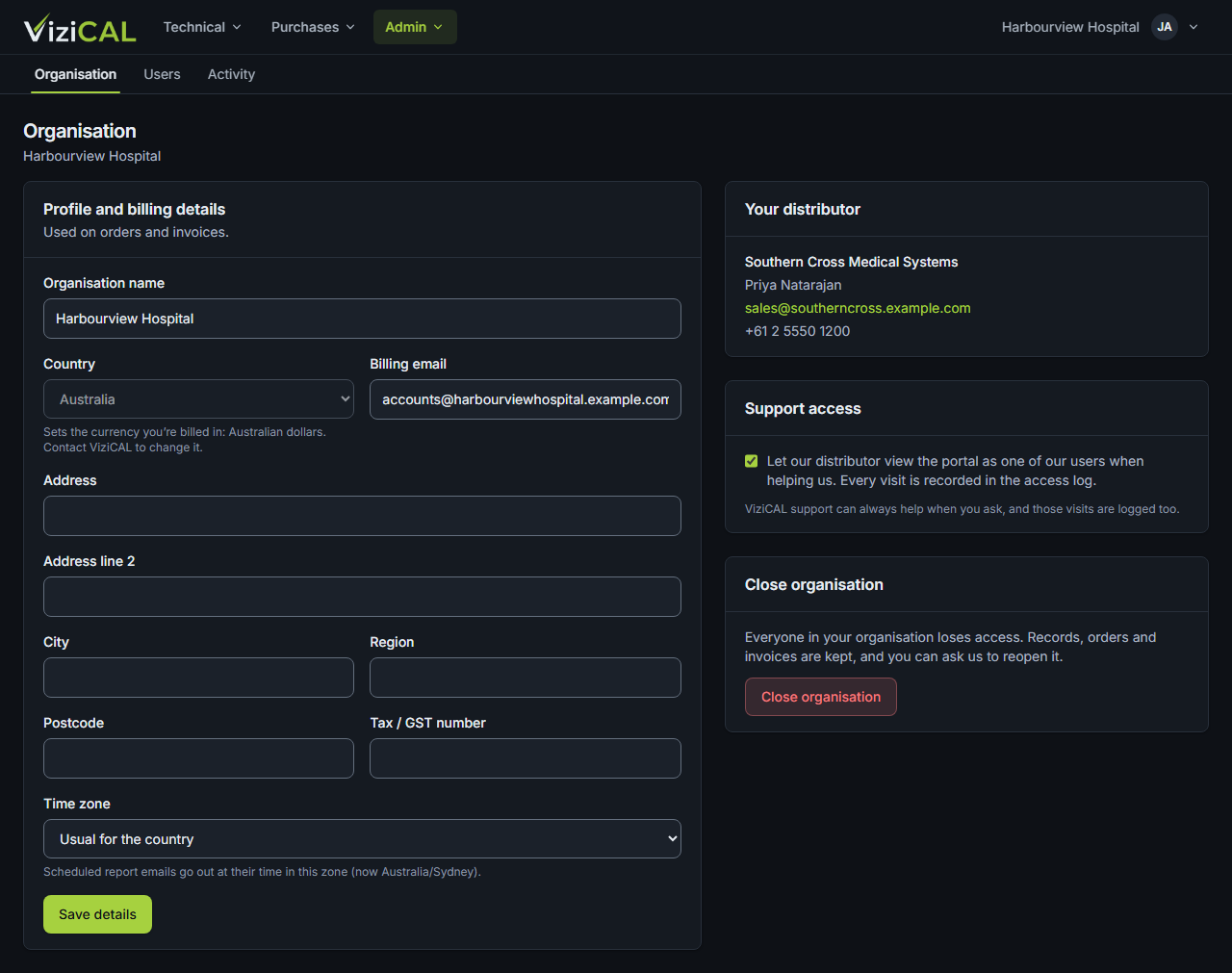
Use this page to change your organisation's details, allow your distributor to help you, or ask us to close the organisation.
Open Admin → Organisation. You need the Customer Admin role.
Profile and billing details
These details are used on orders and invoices.
- Change any of: Organisation name, Billing email, the address, Tax / GST number or Time zone.
-
Click Save details.
-
Country sets the currency you're billed in. Only ViziCAL can change it once it's set.
- Time zone sets when scheduled report emails go out. Choose Usual for the country to use the country's usual time zone.
If you buy through a distributor, Your distributor shows their contact details.
Support access
Tick Let our distributor view the portal as one of our users when helping us to let your distributor see your web account as one of your users while they help you. Every visit is recorded in the access log. See Activity.
ViziCAL support can always help when you ask. Those visits are logged too.
Ask to close the organisation
You can't close your organisation's account yourself. Send us a request instead:
- Under Close organisation, click Request to close organisation.
- Type a Reason (optional).
- Click Send request.
The page says Your request has been sent. Someone from ViziCAL will contact you. Nothing changes until then: everyone can still sign in, and your records are kept.
If your account is then put out of use (made dormant), nobody in your organisation can sign in or buy, and renewals and invoices stop, but all your data is kept. We can reactivate it if you ask within a year.