Technical: User Checks
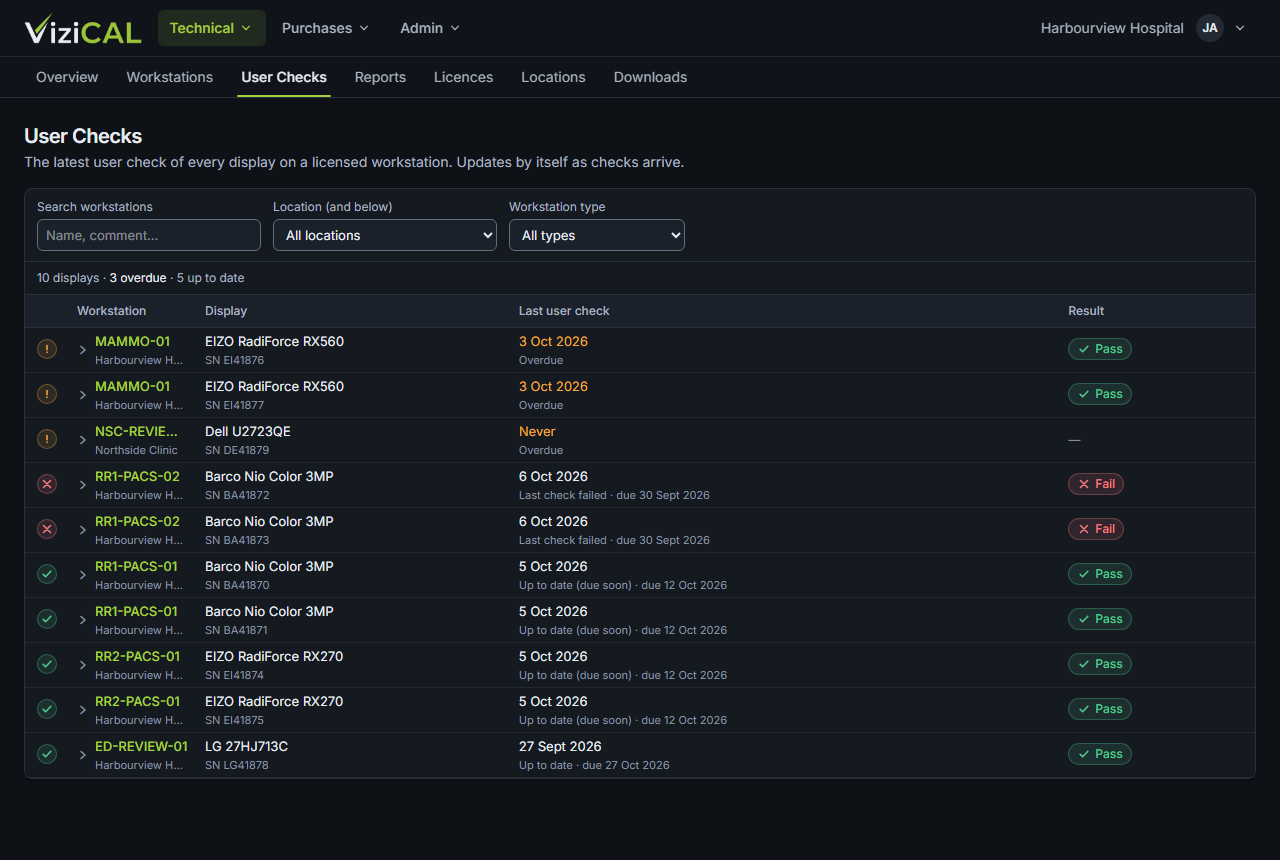
Use this page to see the latest visual check of every display on your licensed workstations, with overdue displays first.
Open Technical → User Checks. The list updates by itself as checks arrive from the ViziCAL app.
What you'll see
Each row shows the display's Status, Workstation, Display, Last user check, Check type and Result. The status is one of:
- Up to date, or Up to date (due soon),
- Overdue,
- Last check failed,
- No check schedule: the workstation has no visual check interval. Set one on the workstation's page (see Workstations).
Click a row to see the Latest check and Earlier checks for that display.
Check type is the kind of visual check that was run: Simple, Daily, JVC, Monthly, Annual or Custom. Checks from older versions of the ViziCAL app don't say, and show Unknown.
Filter the list
Type in the search box, or choose a Location (and below), a Workstation type or a Check type. The filters work together: for example Mammography and Daily shows the Mammography workstations' displays whose latest check was a Daily check. With All check types, every display is listed, including ones with older checks.
Visual check results come from the ViziCAL app. See Run visual checks.